> ## Documentation Index
> Fetch the complete documentation index at: https://docs.falconbot.app/llms.txt
> Use this file to discover all available pages before exploring further.
# Giveaway Commands
> Launch, end, and reroll giveaways with automatic timer tracking and reaction buttons.
Falcon provides a reliable giveaway engine featuring automatic time countdowns, reaction buttons, and multi-winner rerolls.
## Managing Giveaways
### gstart
Creates a new giveaway embed in the active channel with reaction buttons and real-time timer updates.
Falcon Premium allows you to set **role requirements**, **invite requirements**, and **message counts** before members can enter!
```bash Syntax theme={null}
-gstart (time) (winners) (prize)
```
```bash Example theme={null}
-gstart 24h 2 Discord Nitro (1 Month)
```
The duration of the giveaway using time units: `s` (seconds), `m` (minutes), `h` (hours), `d` (days), or `w` (weeks). E.g. `10m`, `2h`, `3d`.
The number of winning members to draw when the timer concludes (e.g. `1`, `3`, `5`).
The name or description of the prize to display in the giveaway embed.
You can also use `-giveawaystart`, `-gcreate`, or the slash command `/gstart`.
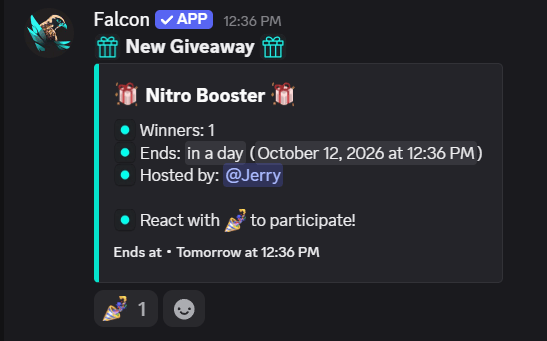 ***
### gend
Concludes an active giveaway immediately and draws the configured number of winners before the original timer expires.
```bash Syntax theme={null}
-gend (message_id)
```
```bash Example theme={null}
-gend 123456789012345678
```
The 18-digit Discord message ID of the active giveaway embed. Right-click the giveaway message and click **Copy Message ID**.
You can also use `-giveawayend`, `-ge`, or the slash command `/gend`.
***
### greroll
Picks new random winners from the pool of valid entrants on an already concluded giveaway.
```bash Syntax theme={null}
-greroll (message_id) [winners]
```
```bash Example theme={null}
-greroll 123456789012345678 1
```
The Discord message ID of the finished giveaway embed.
Optional number of replacement winners to redraw. Defaults to `1`.
You can also use `-giveawayreroll`, `-gr`, or the slash command `/greroll`.
This documentation is built and hosted on [Mintlify](https://mintlify.com), a developer documentation platform.
***
### gend
Concludes an active giveaway immediately and draws the configured number of winners before the original timer expires.
```bash Syntax theme={null}
-gend (message_id)
```
```bash Example theme={null}
-gend 123456789012345678
```
The 18-digit Discord message ID of the active giveaway embed. Right-click the giveaway message and click **Copy Message ID**.
You can also use `-giveawayend`, `-ge`, or the slash command `/gend`.
***
### greroll
Picks new random winners from the pool of valid entrants on an already concluded giveaway.
```bash Syntax theme={null}
-greroll (message_id) [winners]
```
```bash Example theme={null}
-greroll 123456789012345678 1
```
The Discord message ID of the finished giveaway embed.
Optional number of replacement winners to redraw. Defaults to `1`.
You can also use `-giveawayreroll`, `-gr`, or the slash command `/greroll`.
This documentation is built and hosted on [Mintlify](https://mintlify.com), a developer documentation platform.